Ebla Follow Up 
Overview
Ebla Follow Up for EspoCRM enables you to share specific record information with external parties through secure, time-limited public links without requiring authentication. This extension is ideal for scenarios where you need to provide temporary access to record details, such as job application status, order tracking, or survey results.
The extension generates unique URLs that allow contacts or other parties to view designated record information in a clean, read-only interface that automatically expires after a specified time period.
Use Cases
-
Job Application Tracking Share application status and details with job candidates, allowing them to check their progress without logging in.
-
Customer Order Status Provide customers with temporary links to view their order details, shipping information, and current status.
-
Survey Results Sharing Allow survey participants to review their submitted responses or aggregate results.
-
Document Review Workflow Share proposals, quotes, or contracts with clients for review before finalizing.
-
Feedback Collection Enable clients to view project status or deliverables and provide feedback through integrated forms.
-
Service Request Tracking Let customers monitor the progress of their service requests or support tickets.
Key Features
- Secure Link Generation: Create unique, time-limited URLs for any entity record with customizable expiration periods.
- Formula Functions Integration: Three powerful formula functions (
createLink,send,setTerminateAt) for complete link lifecycle management within workflows and business processes.
- Flexible Email Distribution: Send links via default templates or custom email templates, with automatic URL injection and support for multiple recipients.
- No Authentication Required: Public entry point allows external parties to view records without creating user accounts or logging in.
- Customizable Layouts: Configure entity-specific layouts for the public view, ensuring appropriate information display for external audiences.
- Automatic Expiration: Links automatically expire based on configured time periods, enhancing security and controlling access duration.
- Multi-Party Support: Send links to multiple contacts or parties associated with a record through relationship fields.
- Template Customization: Use built-in templates or create custom email templates with full Htmlizer support for dynamic content.
How It Works
1. Link Creation
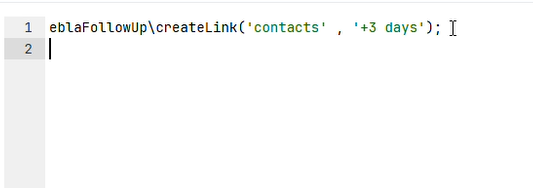
Use the eblaFollowUp\createLink() formula function to generate a unique link for a record:
// Create a link that expires in 7 days
$linkId = eblaFollowUp\createLink('contacts', '+7 days');
2. Link Distribution
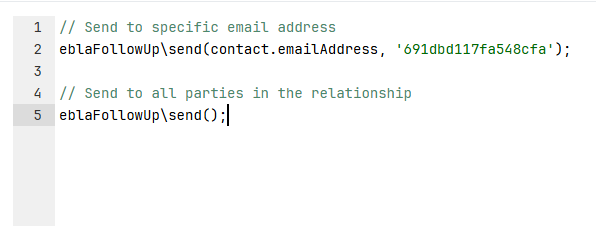
Send the link to intended recipients using the send() formula function:
// Send to specific email address
eblaFollowUp\send('john@example.com', 'template-id');

// Send to all parties in the relationship
eblaFollowUp\send();
3. Public Access
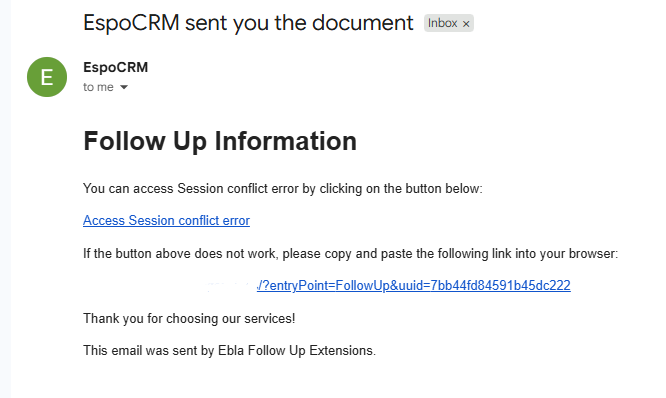
Recipients receive an email with a unique URL in the format:
https://your-crm.com/?entryPoint=FollowUp&uuid=unique-identifier
4. Link Management
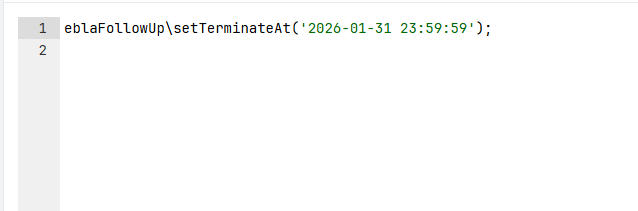
Update link expiration as needed:
// Extend expiration by 3 days from now
eblaFollowUp\setTerminateAt('+3 days');

// Set specific expiration date
eblaFollowUp\setTerminateAt('2025-12-31 23:59:59');
Formula Functions
eblaFollowUp\createLink(linkName, terminateAt)
Creates a unique public link for the current record.
Parameters:
linkName(string, required): The relationship field name containing the parties who should have access (e.g., "applicant", "contacts", "accounts")terminateAt(string, optional): Expiration time modifier or datetime. Default: "+1 day"- Examples: "+7 days", "+1 week", "+2 hours", "2025-12-31 23:59:59"
Returns: String - Unique identifier for the generated link
Behavior:
- Checks for existing link and returns it if found
- Creates new Unique Id if no link exists
- Sets expiration based on terminateAt parameter
Example:
// In a workflow or formula script
$uuid = eblaFollowUp\createLink('applicant', '+14 days');
description = string\concatenate('Follow-up link: ', $uuid);
eblaFollowUp\send(emailAddress, emailTemplateId)
Sends email containing the follow-up link to specified recipients.
Parameters:
emailAddress(string, optional): Specific email address to send to. If not provided, sends to all parties in the linked relationshipemailTemplateId(string, optional): ID of custom email template to use. If not provided, uses default template
Returns: Boolean - true on success
Behavior:
- If emailAddress specified: sends to that address only
- If no emailAddress: retrieves all entities from the relationship and sends to each
- If emailTemplateId specified: uses custom template
- If no template: uses default template from
Resources/templates/eblaFollowUp/ - Automatically includes
{siteUrl}placeholder with complete follow-up URL - Supports both HTML and plain text emails
- Includes template attachments if using custom template
Examples:
// Send to specific email with custom template
eblaFollowUp\send('candidate@example.com', 'application-status-template');

// Send to all contacts linked via 'applicant' field
eblaFollowUp\send();

// Send using default template to specific address
eblaFollowUp\send(applicant.emailAddress);
eblaFollowUp\setTerminateAt(terminateAt)
Updates the expiration time for an existing link.
Parameters:
terminateAt(string, required): New expiration time as datetime string or time modifier- Examples: "+3 days", "2026-01-15 18:00:00", "+1 week"
Returns: Boolean - true if update successful
Behavior:
- Finds existing UniqueId for the current record
- Updates the terminateAt field
- Saves changes to database
Example:
// Extend link by 7 more days
eblaFollowUp\setTerminateAt('+7 days');

// Set specific expiration
eblaFollowUp\setTerminateAt('2026-01-31 23:59:59');
Configuration
Entity Setup
To enable Follow Up links for an entity:
-
Create Relationship
- The entity should have a relationship to Contact (or another entity containing email addresses)
- Common relationship names:
applicant,contacts,customers
-
Configure Custom Layout (Optional)
Specify which layout to use for the public view in entity metadata:
{
  "clientDefs": {
    "YourEntity": {
      "eblaFollowUpDefaultLayoutName": "detailFollowUp"
    }
  }
}
If not specified, the system uses the
detailSmalllayout by default. -
Create Custom Layout
- Go to Administration → Layout Manager → {Your Entity}
- Create a new detail layout named
detailFollowUp(or your custom name) - Add only the fields appropriate for external viewing
- Remove sensitive or internal-only fields
Email Template Setup
Using Default Template
The extension includes default email templates in Administration → Template Manager → Ebla Follow Up You can customize these templates as needed, or you can create custom templates.
Available placeholders:
{siteUrl}: Complete follow-up URL{applicationName}: Your CRM application name- All standard entity field placeholders
Using Custom Templates
- Create an email template in Emails → Email Templates
- Design your template content
- The system will automatically inject
{siteUrl}if not present - Pass the template ID when calling
send():
eblaFollowUp\send(contact.emailAddress, 'your-template-id');
Support and Feedback
For inquiries, support, or feedback regarding the Ebla Follow Up extension, please visit our portal and create a ticket. We are committed to ensuring a seamless experience and are here to assist you with any questions or concerns.