Ebla Units Field 
Ebla Units helps you store values in different units while also keeping a normalized value for easy comparison and reporting.
Overview
Ebla Units adds two custom field types to EspoCRM:
unitIntfor whole-number quantities with a unit code.unitFloatfor decimal quantities with a unit code.
It also provides a simple Unit Group area where admins can define which units belong together, such as length, weight, time, or volume.
What the extension provides
- Two custom field types:
unitIntandunitFloat. - An automatic converted value in the base unit.
- A Unit Group area for managing available units and conversion rates.
- Seeded default unit groups after installation.
- Easy comparison of values even when records use different units.
Installation and first setup
After installing the extension, default Unit Groups are created automatically.
Seeded groups include:
| Group | Base Unit | Included Units |
|---|---|---|
| Length | M |
MM, CM, M, KM, IN, FT |
| Weight | KG |
MG, G, KG, T, OZ, LB |
| Time | SEC |
SEC, MIN, HR, DAY |
| Volume | L |
ML, L, M3, GAL |
You can review or extend these groups from:
- Administration > Ebla Extensions > Ebla Unit Group
- or directly from the
EUnitGrouptab if it is visible in your environment.
Field Types
unitInt
Use this field when the value must stay a whole number, such as boxes, rooms, packages, or item counts.
- Stores the source value as an integer.
- Rejects decimal input.
- Lets the user choose a unit from the selected Unit Group.
- Automatically calculates the value in the base unit.
unitFloat
Use this field when the value can include decimals, such as length, weight, duration, or volume.
- Stores the source value as a decimal number.
- Supports precise measurements.
- Lets the user choose a unit from the selected Unit Group.
- Automatically calculates the value in the base unit.
Automatic converted value
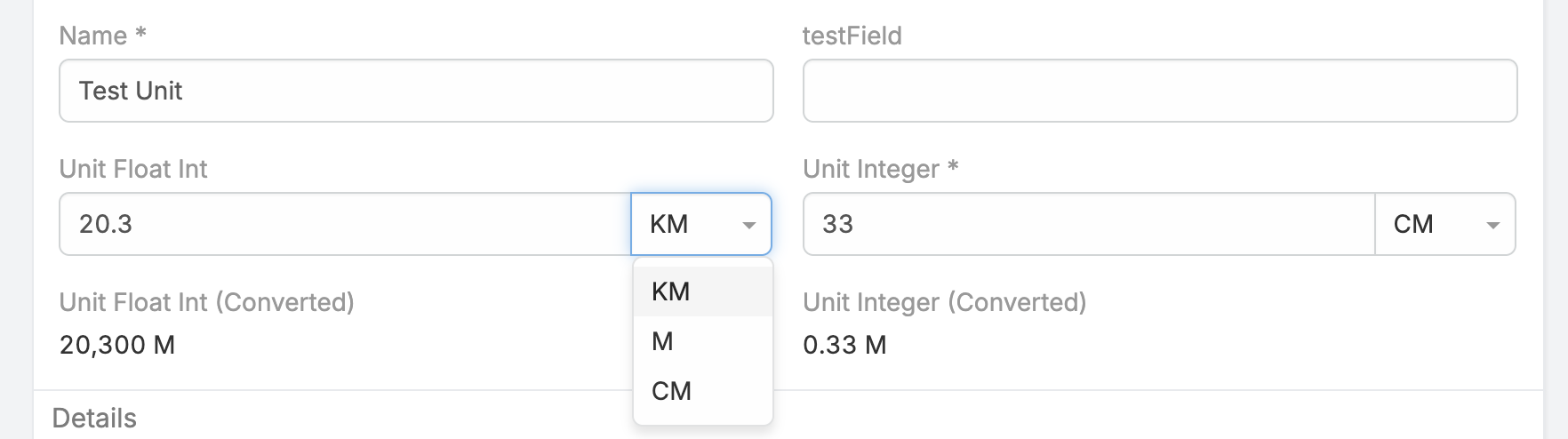
Each unit field also creates an automatic converted value.
Example:
- If the base unit is
Mand a record stores3 KM, the converted value becomes3000 M. - If another record stores
250 CM, the converted value becomes2.5 M.
This makes it much easier to compare records that use different units.
Why use the converted value
The converted value is useful when you want to:
- compare records fairly even if users entered different units,
- build reports using one consistent measurement,
- show both the entered value and the normalized value on screen.
For most users, the main field is used for data entry, while the converted value is useful for review, reporting, and comparison.
Managing Unit Groups
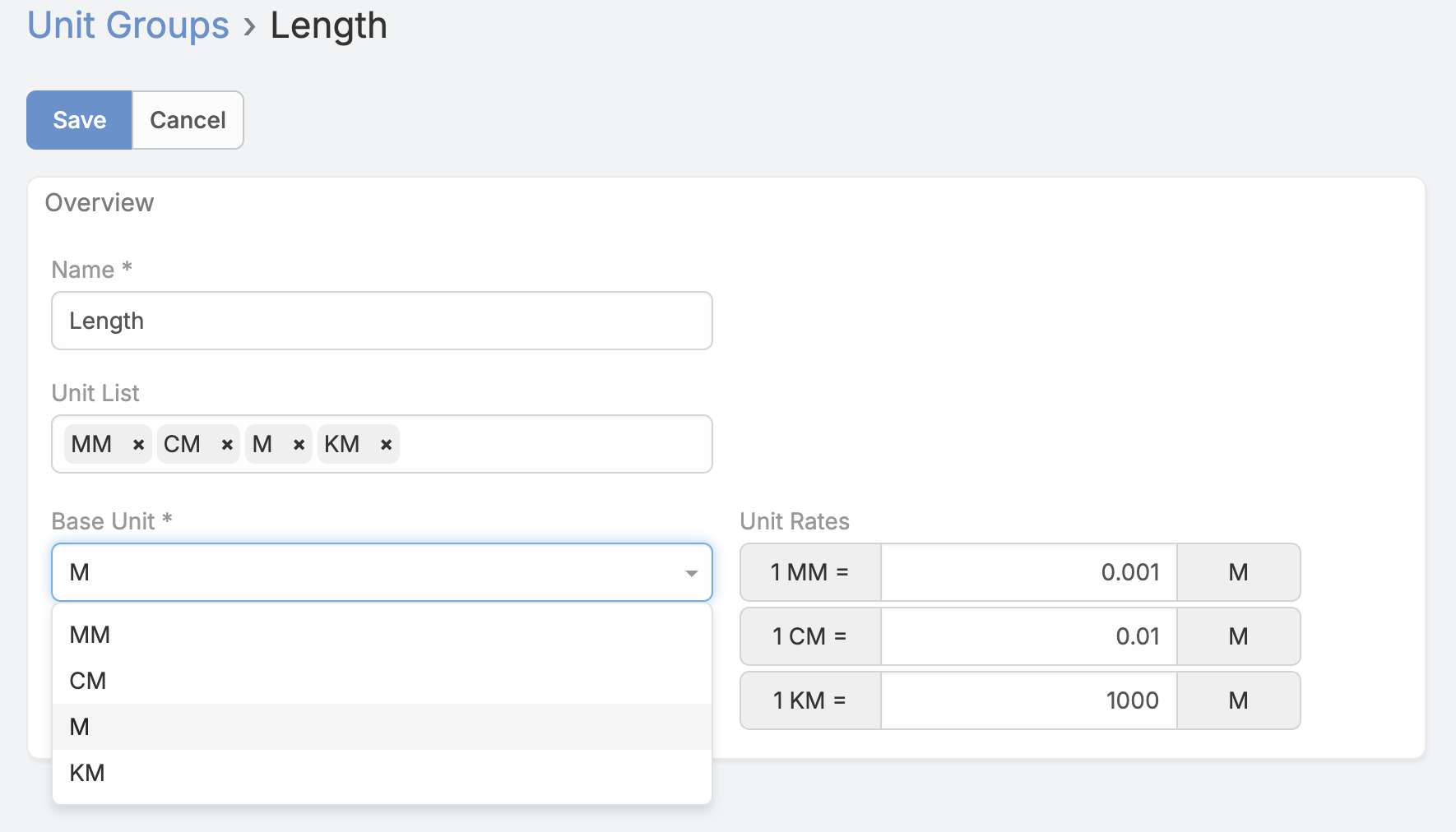
Unit Groups define which units belong together and what the base unit is.
Each Unit Group lets you define:
- the group name,
- the list of allowed units,
- the base unit,
- the conversion rates.
unitList
This is the list of units users can choose from.
Examples:
MM,CM,M,KM,IN,FTMG,G,KG,T,OZ,LB
baseUnit
The reference unit used for conversion and normalized storage.
Important:
- The base unit must be one of the units included in
unitList.
unitRates
This tells the system how each unit converts to the base unit.
The UI format is:
1 <unit> = X <baseUnit>
Examples for a Length group with base unit M:
1 KM = 1000 M1 CM = 0.01 M1 MM = 0.001 M1 IN = 0.0254 M
Recommended setup flow
- Open Administration > Ebla Extensions > Ebla Unit Group.
- Review existing default groups or create a new group.
- Fill
unitListwith all unit codes you want to allow. - Pick the
baseUnit. - Enter
unitRatesusing the format1 unit = X baseUnit. - Save the group.
- Open Administration > Entity Manager.
- Add a new field of type
unitIntorunitFloat. - Select the required
unitGroup. - Add the main field to layouts.
- Optionally add the converted value to layouts if you want easier comparison.
Usage
Example 1: Package quantity
Use unitInt when values must remain whole numbers.
- Field:
packageSize - Type:
unitInt - Unit Group: custom packaging group
- Possible units:
BOX,CARTON,PALLET
Users enter an integer quantity and select its unit.
Example 2: Product length
Use unitFloat when decimal precision is required.
- Field:
productLength - Type:
unitFloat - Unit Group:
Length - Decimal Places:
2
Users can enter values like 2.75 M or 125 CM, while the system also keeps a normalized value in the base unit.
Example 3: Normalized reporting
If you store a dimension, weight, or duration field in mixed units, add the converted value to list views or reports so users can compare records in one unit system.
Notes
- Source values remain typed according to the selected field type.
- Unit options are loaded dynamically from the defined Unit Groups.
- Changing the selected Unit Group changes the available unit options for the field.
- If either the value or unit is missing, the converted value is cleared.
- Unit Groups are intended for admin configuration; end users typically interact only with the generated unit fields on records.
Changelog
Support and Feedback
- Open a ticket through the Eblasoft support portal if you need installation or configuration help.
- Contact the support team for assistance with unit setup or best practices.
Copyright (c) Eblasoft Bilişim Ltd.