Ebla Link Pro 
Overview
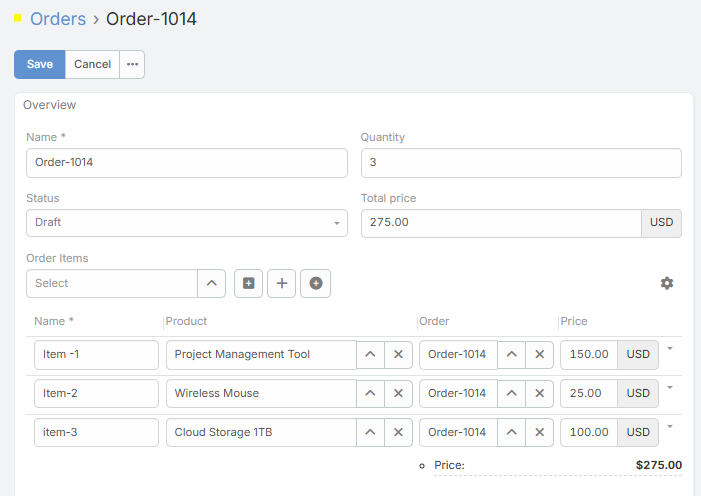
Ebla Link Pro turns standard EspoCRM relationship fields into richer record screens. Link Multiple fields can be shown as inline lists with configurable columns, row actions, inline editing, footer totals, quick creation, and selection buttons. Link One fields can be shown as an embedded form for the linked record.
Use it when users need to work with related records without leaving the parent record. Common examples include order items on an order, invoice lines on an invoice, products on a quote, or any child records that should be created and maintained inside the parent detail view.
Requirements
- EspoCRM 9.3 or later.
- PHP 8.1 or later.
- The field must be configured in Administration > Entity Manager > the target entity > Fields.
After changing field settings, rebuild EspoCRM metadata if the system does not apply the change immediately.
Relationship Support
Link One
For Link One fields, enable the form to display the linked record directly inside the parent record. You can choose the detail layout and edit layout used for the embedded record.
This is useful for one-to-one details where the linked record should feel like part of the parent form.
One-to-Many
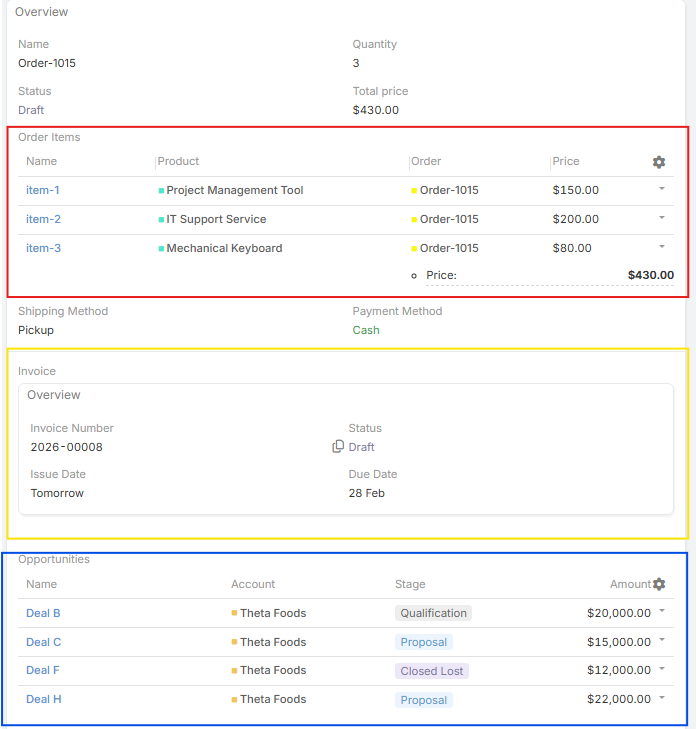
One-to-Many relationships provide the full inline list experience:
- Add rows directly from the parent record.
- Edit child record fields inline.
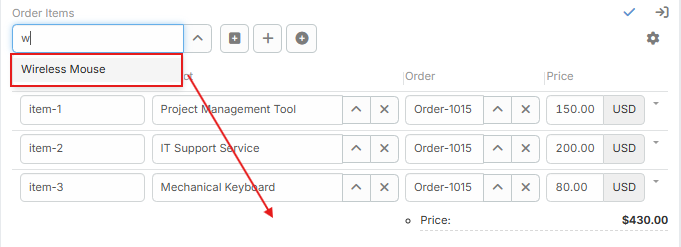
- Select existing records when enabled.
- Create records in a modal when enabled.
- Configure row actions such as view, edit, unlink, and remove.
- Calculate footer totals and map them back to parent fields.
- Use a manual custom order field for drag-and-drop sorting.
Many-to-Many
Many-to-Many fields can be displayed as a related list and can use available actions such as view, edit, unlink, and remove. Inline editing is not supported for Many-to-Many fields; users open the linked record or the related middle record to edit its data.
Middle Entity Setup
Use Middle Link when a One-to-Many child entity acts as the junction between the parent record and another target record.
Example:
- Order has many Order Items.
- Order Item links to Product.
- The Order record displays Order Items inline, while each row can point to a Product.
This pattern is useful when the relationship needs its own fields, such as quantity, price, discount, notes, or custom status.
Middle Entity options:
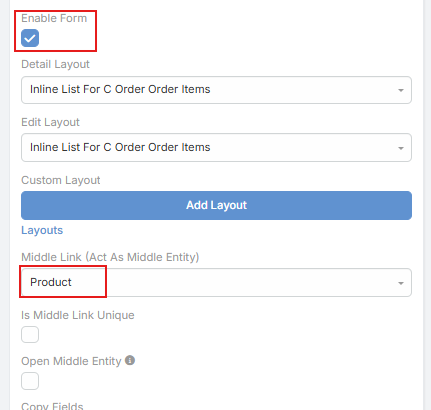
- Middle Link: Select the field on the child entity that points to the target record.
- Is Middle Link Unique: Prevents selecting the same target record more than once in the list.
- Open Middle Entity: Controls whether row click/view actions open the middle child record or the final target record.
- Copy Fields: Automatically copy values from the target record into the child record fields upon selection.
Parent Link Middle Fields
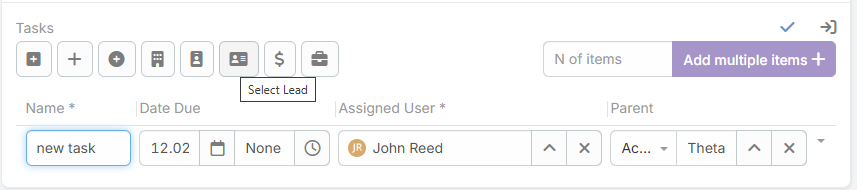
If the selected middle field is a Parent field, Link Pro detects the allowed parent entity types and shows separate select buttons for each type, such as Select Account, Select Contact, or Select Opportunity.
Footer Totals
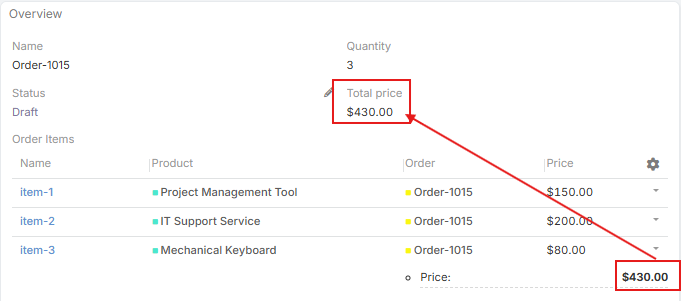
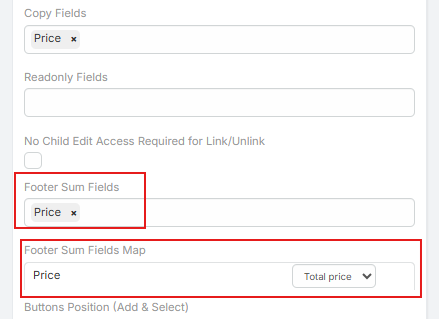
Footer totals calculate numeric fields in the inline list. You can show totals under the list and map a total into a field on the parent record.
Example:
- Sum Order Item > Amount.
- Map the result to Order > Total Amount.
- The parent field updates while users edit rows.
List Display Mode
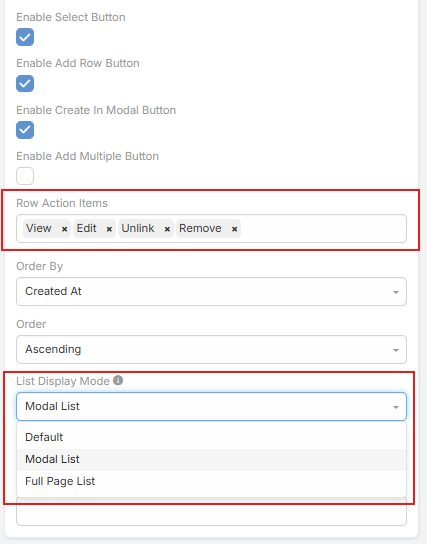
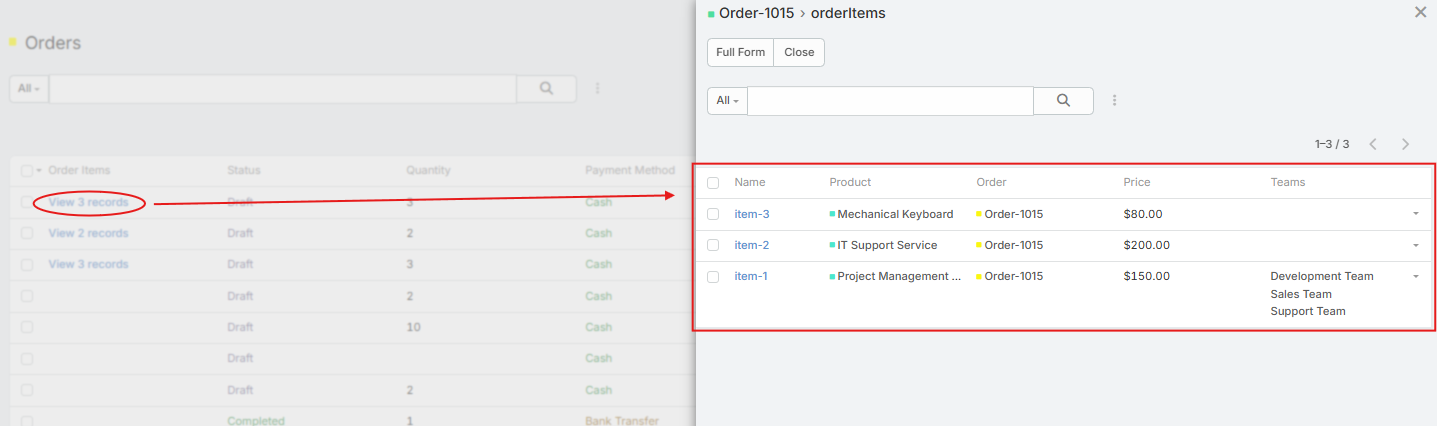
For Link Multiple fields shown in list views, choose how related records are represented:
- Default shows linked record names.
- Modal List shows a link that opens related records in a modal list.
- Full Page List opens the standard related-record list page.
Field Settings
Open Administration > Entity Manager > your entity > Fields, then edit the Link One or Link Multiple field.
Basic Settings
- Enable Form: Activates the Ebla Link Pro interface (inline list for Link Multiple, or embedded form for Link One).
- Layout: Determines which layout configuration is rendered when viewing the parent record. For Link One, this selects the exact layout block used for the embedded record view.
- Edit Layout: Determines which layout configuration is used when the user is editing the inline list rows or the embedded Link One record.
- Custom Layout (Link Multiple Only): Manually define and arrange the exact columns to be displayed in the inline list.
Buttons
- Enable Select: Displays the button allowing users to select and link existing records.
- Enable Add: Displays the button allowing users to create new inline records.
- Enable Create In Modal: Changes action to open standard create form in a popup modal.
- Enable Add Multiple: Allows selecting and adding multiple existing records at once.
- Buttons Position: Place the 'Add' and 'Select' buttons at the top or bottom of the field container.
Row Behavior
- Row Action Items: Multi-select actions available on each row (
view,edit,unlink,remove). Select what the users are permitted to do. - Read-only Fields: Multi-select list of fields that are visible but not editable inline.
- No Edit Access Required For Unlink: Allows unlinking a child record without requiring edit permission on the child record itself.
- Order By & Order Direction: Sets the default sorting column and direction (
ascordesc) for the records in the list. - Custom Order: Select an integer, float, or auto-increment field to enable manual drag-and-drop ordering. When enabled, it replaces ‘Order By’ and ‘Order Direction’.
Data Mapping & Calculations
- Copy Fields: Automatically copy values from selected records into the inline row fields.
- Footer Sum Fields: Select numeric fields to be aggregated/summed in the footer area.
- Footer Sum Fields Map: Map the calculated footer totals back into a designated parent record field to keep it synchronized.
Dynamic Logic
Inline rows respect field dynamic logic for visibility, required state, and read-only state. This lets each row react to its own values while users edit the parent record.