Ebla Email Plus 
Overview
Ebla Email Plus extends EspoCRM email with:
- Email open tracking for outgoing HTML emails
- Global email styling for consistent branding
- Global email wrappers for reusable branded email layouts
- Signature templates (including domain-based signature matching)
- Quick inbox access from a live navbar email panel with unread badge updates
- Enhanced mass email composition and delivery options
- Advanced filters and productivity actions
All features are configurable from a dedicated admin page and related Email/Preferences screens.
Key Features
1. Email Open Tracking
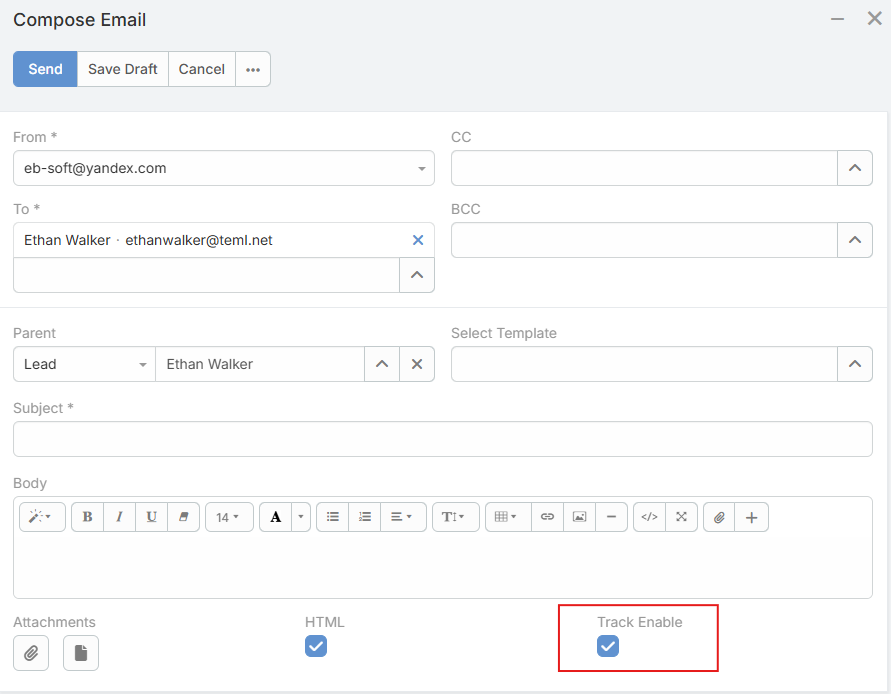
- Embed a tracking pixel in outgoing HTML emails to detect when recipients open them
- Enable tracking globally by default, or toggle it per email while composing
- Configure a custom tracking domain for CRM instances behind a VPN or proxy
2. Global Email Styles
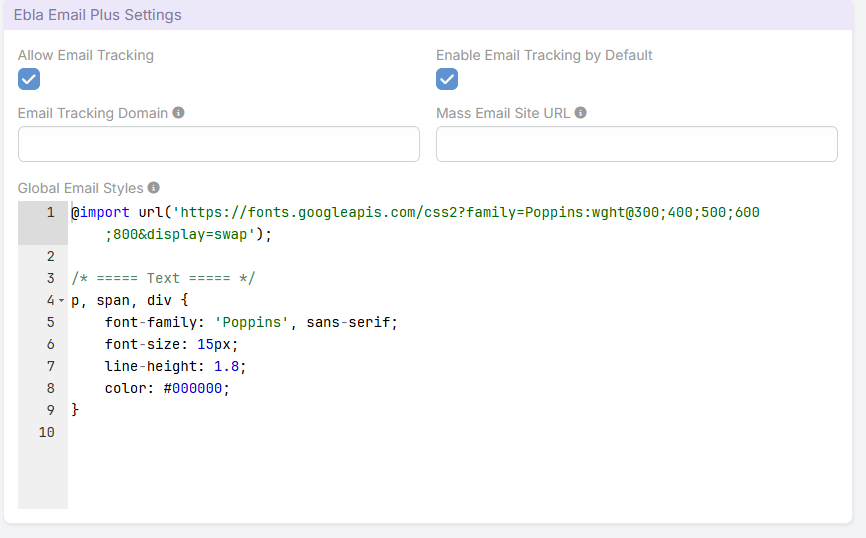
- Define CSS styles that are automatically injected into every outgoing HTML email (regular and mass)
- Ensure consistent branding and formatting across all email communications
3. Global Email Wrapper
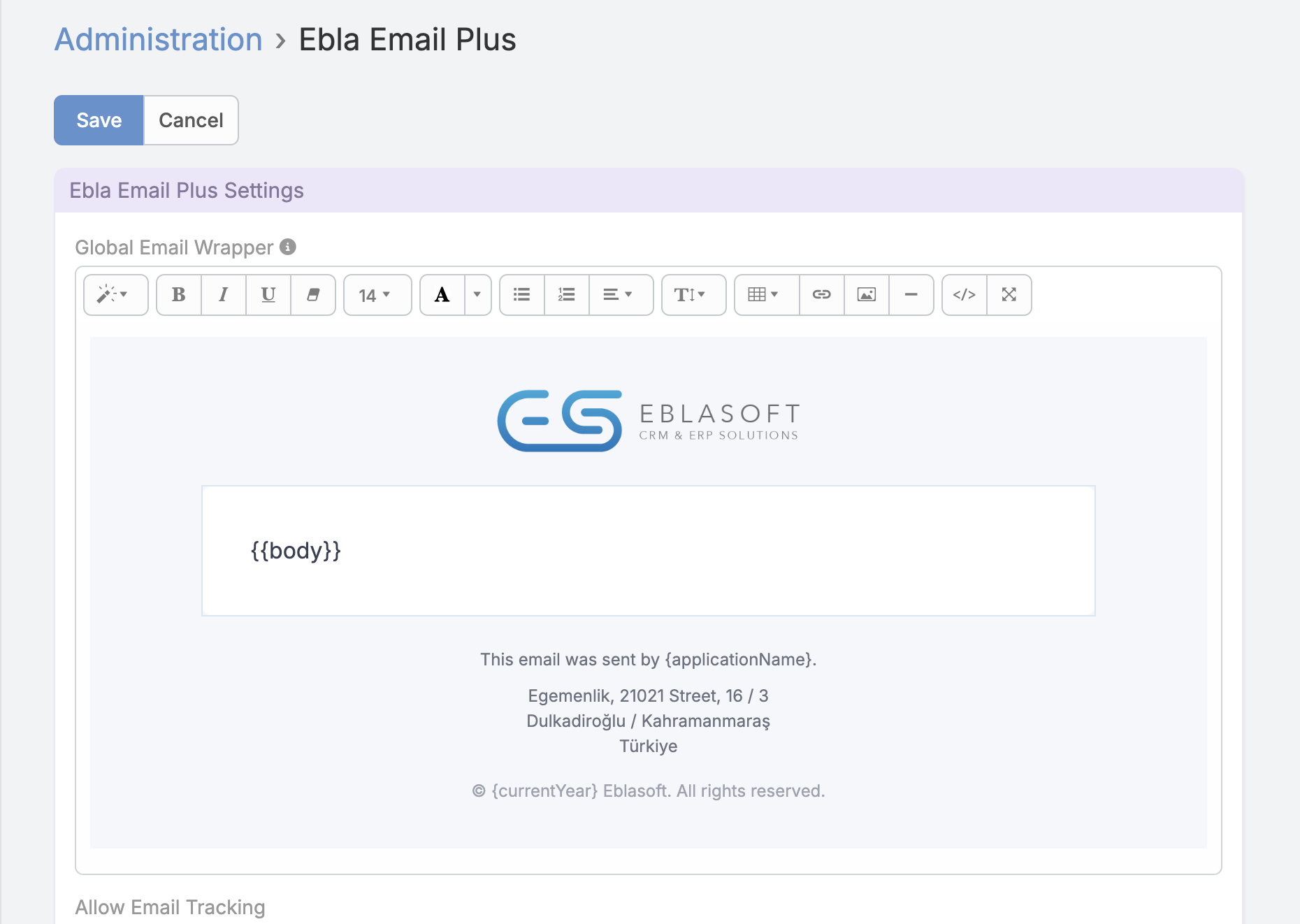
- Create reusable HTML around email body templates for consistent branding
- Add the required
{{body}}marker where the original email body should appear - Use Espo email-template placeholders such as
{today},{now},{currentYear}, and{applicationName}when needed - Keep headers, footers, brand containers, and layout HTML consistent across template-based emails
4. Signature Templates
- Create reusable email templates marked as Signature Templates
- Optionally bind a signature template to a specific sender domain so it is applied automatically based on the From address
- Signature content and attachments are appended to outgoing emails during send
-

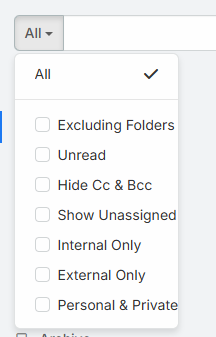
5. Enhanced Email Filters (Bool Filters)
- Excluding Folders: exclude emails belonging to specific folders
- Unread: show only unread emails
- Hide CC & BCC: hide emails where you are only in CC or BCC
- Show Unassigned: display emails with no assigned user
- Internal Only: show emails exchanged within the CRM
- External Only: show emails from external addresses only
- Personal & Private: display emails with no teams or parent record
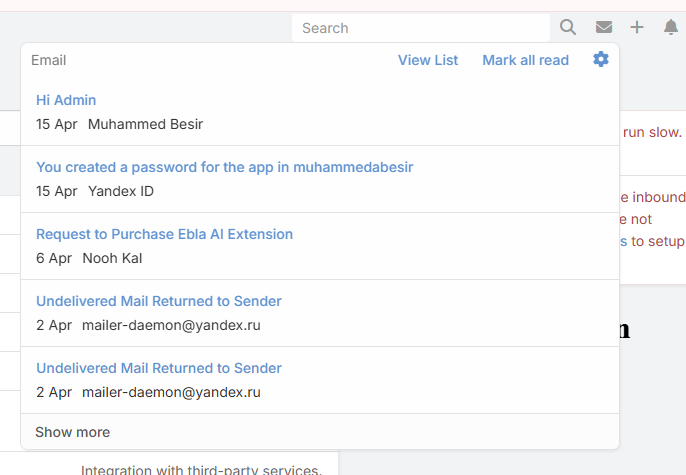
6. Navbar Email Panel with Live Unread Badge
- Adds an email icon to the top navbar so users can access their inbox from anywhere in the CRM
- Displays a live unread badge counter and refreshes inbox counts automatically in the background
- Opens a quick email panel for faster inbox triage without leaving the current page
- From the panel, users can: - See the latest inbox emails - Mark all emails as read - Open the full Email list view
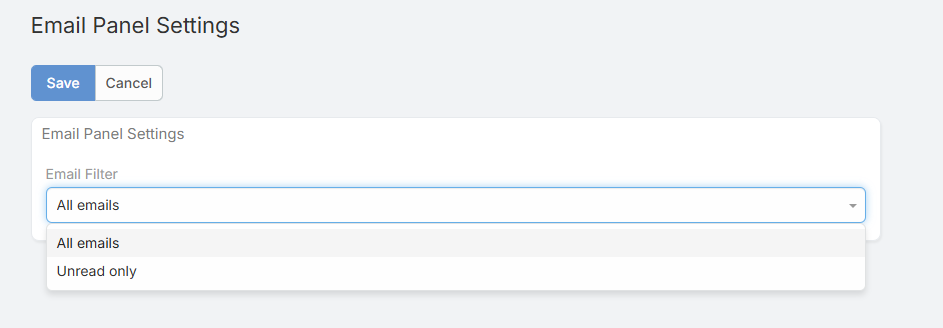
- Includes a user setting to switch panel content between All and Unread emails
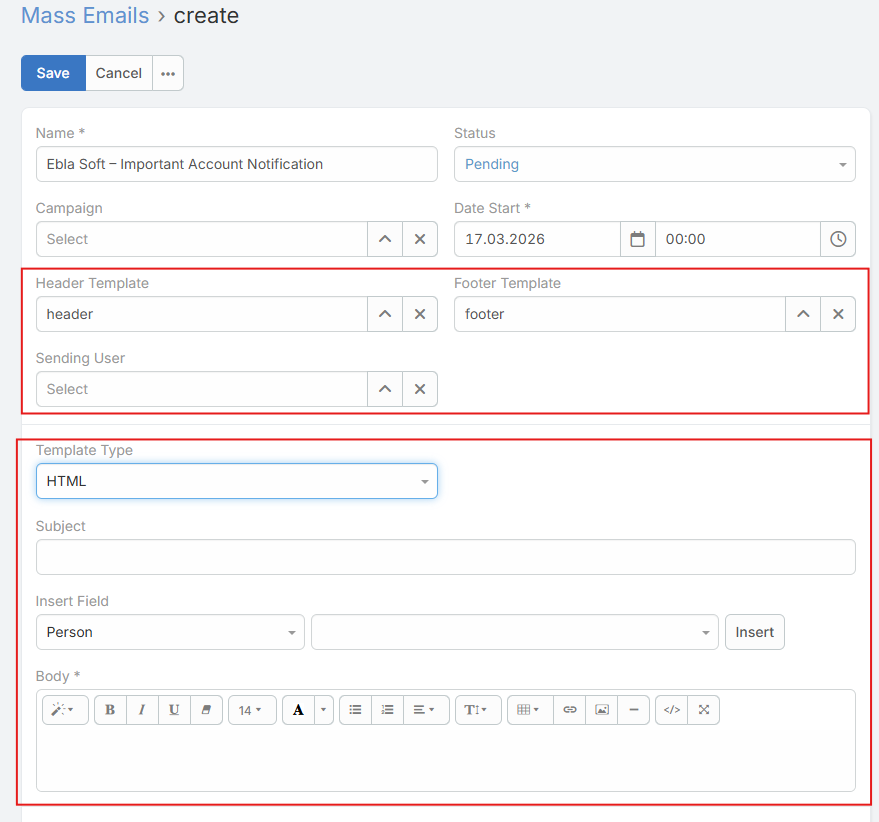
7. Enhanced Mass Email
- Header & Footer Templates: select Email Templates to be automatically injected at the beginning (Header) and end (Footer) of the mass email content
- Sending User: a link field to a User record that defines who the email is sent from and is used to resolve template placeholders
- Template Types: choose how to compose the mass email using the
templateTypefield:- Email Template (
emailTemplate): select an existing Email Template via a link field; the template defines the subject and body - HTML (html): compose the email manually using HTML with:- Subject field - HTML body editor - Insert Placeholder functionality (same as Email Templates) to quickly populate fields without creating a template- Plain Text (
plain): same as HTML mode, but the body is plain text instead of HTML - Markdown (markdown): compose in Markdown and let the extension convert it to HTML before send
- Delivery Controls: mass email sending works with EspoCRM outbound settings for:
- Max sent per hour - Max sent per batch - Mandatory opt-out links (with optional disable) - Open tracking for campaign emails - VERP envelope sender support
8. Email Productivity Tools
- Download as EML: export any email as a standard
.emlfile that can be opened in any email client - Convert Email to Template: create a reusable Email Template from any existing email
- Create Contacts from Recipients: auto-create Contact records for unknown email addresses found in an email's From, To, CC, and BCC fields
- Add Recipients to Target List: create a Target List pre-filled from detected recipients
- Reply to All: use a dedicated action on email detail that includes original message metadata (From, Date, Subject, To, CC)
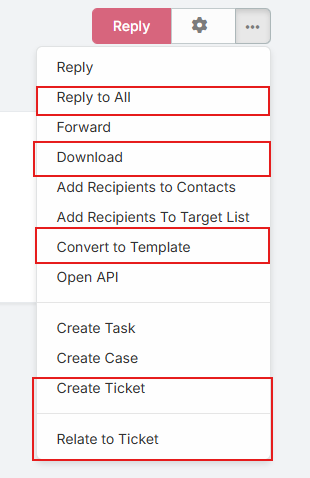
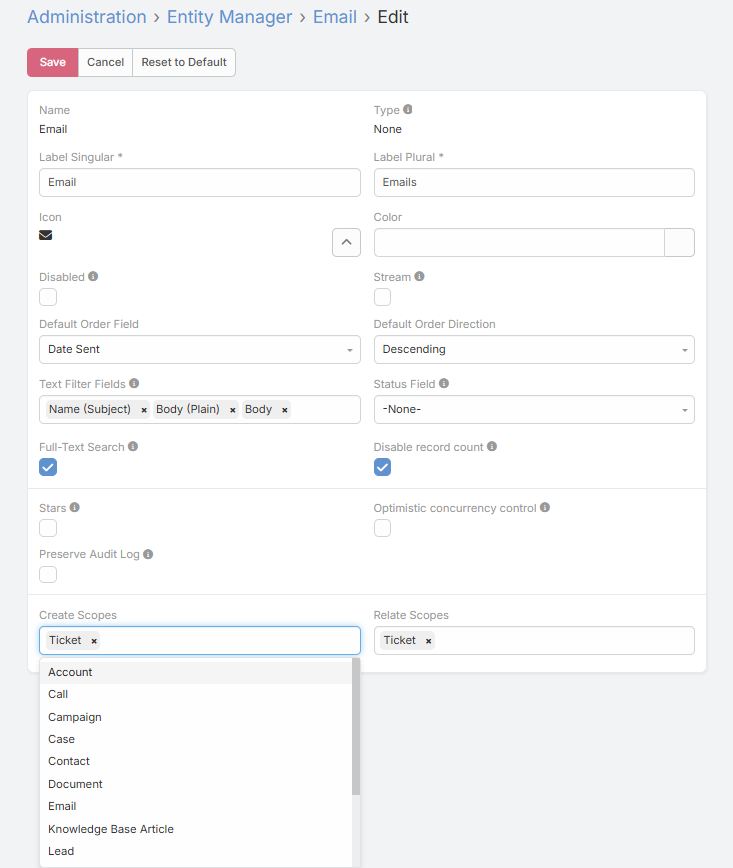
9. Configurable Entity Actions from Email
- Create Scopes: configure which entity types (e.g., Contact, Lead, Account) can be created directly from an email via the Entity Manager
- Relate Scopes: configure which entity types an email can be related to via the Entity Manager
- Both settings are managed through the standard EspoCRM Entity Manager for the Email entity
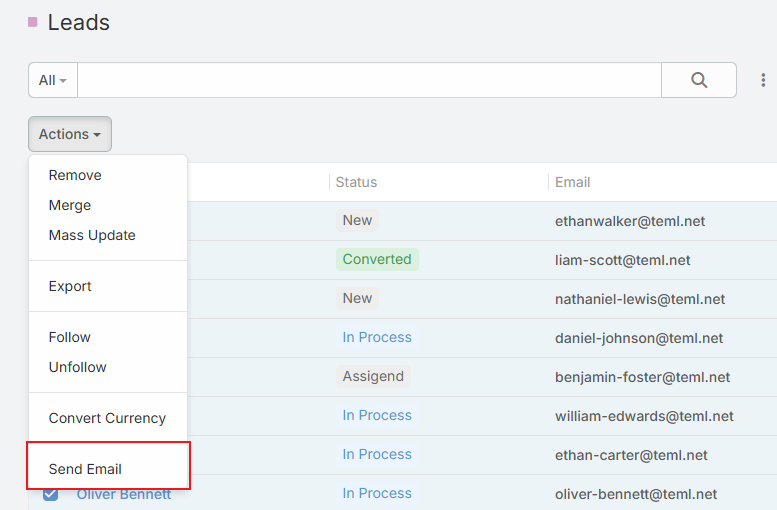
10. Mass Send Email Action
- A Send Email mass action available on any entity list view that has an email address field
- Select multiple records and compose a single email to all selected recipients
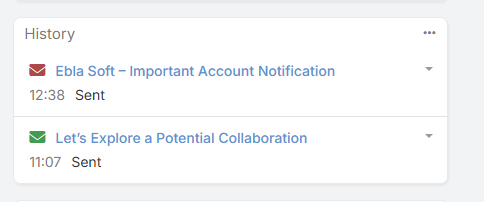
11. Enhanced Activity History
- The email history panel on entity detail views displays an icon indicating the open status of each email — red if the email has not been opened, and green if it has been opened — alongside date, status, and attachment indicators
Admin Configuration
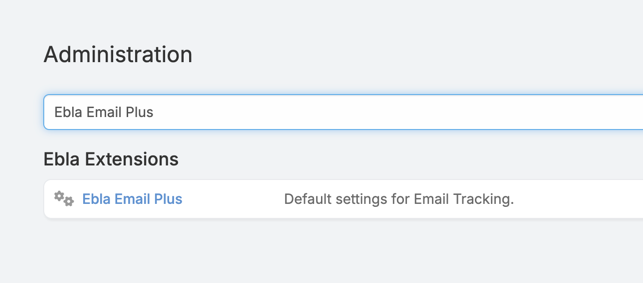
Go to Administration > Ebla Email Plus Settings.
All extension settings are accessible via Administration → Ebla Extensions → Ebla Email Plus.
| Setting | Description |
|---|---|
| Allow Email Tracking | Enable or disable email open tracking globally |
| Enable Email Tracking by Default | Automatically enable tracking on every new email compose (visible only when tracking is allowed) |
| Email Tracking Domain | Custom domain for tracking pixel URLs (e.g., track.example.com) |
| Mass Email Site URL | Base URL used in mass email opt-out and tracking links |
| Global Email Styles | CSS styles injected into all outgoing HTML emails |
| Global Email Wrapper | HTML wrapper for body templates. Add {{body}} where the original body should be inserted. Supports {today}, {now}, {currentYear}, and {applicationName} |
The extension also adds an Email Panel Settings page under the user Preferences area, where users can switch the email panel between all and unread mail.
How to use Global Email Wrapper
- Go to Administration → Ebla Extensions → Ebla Email Plus.
- Paste your wrapper HTML into Global Email Wrapper.
- Add
{{body}}exactly where the original email body should appear. - Save the settings.
The {{body}} marker is required. If it is missing, the original email body is sent without the wrapper.
Supported placeholders:
{today}— today's date{now}— current date and time{currentYear}— current year{applicationName}— application name from EspoCRM settings
Example:
<div style="font-family: Arial, sans-serif; background: #f4f7fb; padding: 24px;">
<div style="max-width: 640px; margin: 0 auto; background: #ffffff; padding: 32px;">
<h2>{applicationName}</h2>
{{body}}
<p style="font-size: 12px; color: #6b7280;">
© {currentYear} Eblasoft. All rights reserved.
</p>
</div>
</div>
User-Level Email Panel Setting
Users can open Email Panel Settings from their preferences area to control how the navbar panel loads emails:
- All: show latest inbox emails regardless of read state
- Unread: show only unread inbox emails for faster triage
Entity Manager Configuration
Navigate to Administration → Entity Manager → Email to configure:
- Create Scopes: entity types available in the "Create" dropdown on email detail view
- Relate Scopes: entity types available in the "Relate to" dropdown on email detail view
Use Cases
-
Email Marketing Performance Track open rates at both email and campaign level. Use header/footer templates for consistent branding across mass emails.
-
Team Email Collaboration Filter emails by internal/external origin, unread status, or assignment. Use the email panel and folders to triage faster.
-
Lead Generation & CRM Enrichment Convert unknown recipients into Contact records with a single click. Add recognized recipients to target lists for future campaigns.
-
Customer Communication Management Relate emails to any entity type, download emails as EML for archiving, and convert frequently used emails into reusable templates.
-
Consistent Email Branding Apply global CSS styles, a shared body wrapper, and domain-specific signature templates to ensure every outgoing email matches your brand guidelines.
Support and Feedback
For inquiries, support, or feedback regarding the "Ebla Email Plus" extension, please reach out through our portal to create a support ticket.