Ebla Open Street Map 
Overview
Ebla Open Street Map adds an OpenStreetMap-based map provider to EspoCRM. It replaces Google Maps usage with Leaflet and OpenStreetMap tools and adds address search, coordinate filling, draggable markers, polygon drawing, map list view, and route calculation.
Main Features
- OpenStreetMap Provider: Switch EspoCRM to
OpenStreetMapfrom the settings page. - Address Search and Geolocation: Search addresses, detect the current position, and fill address values and coordinates.
- Automatic Geocoding: Save a changed address and automatically fill latitude, longitude, and raw geocoding data.
- Address Map Features: Drag the marker and draw polygons on the address map.
- Map List View: Show records on a map in list view.
- Map Route Field: Add a route field that can calculate distance and duration between multiple points.
How to Activate the Extension
After installation, the most important first step is to activate the provider:
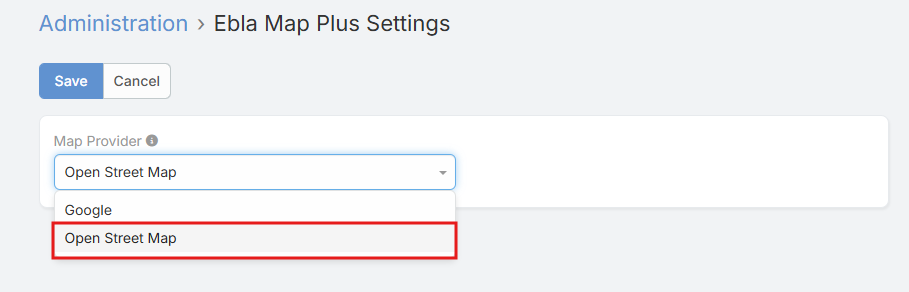
- Open Administration -> Ebla Extensions -> Ebla Open Street Map Settings.
- Set Map Provider to
OpenStreetMap. - Optionally choose Measurement Format.
- Save.
Settings
| Setting | Description |
|---|---|
Map Provider |
Selects the active map provider. For this extension, choose OpenStreetMap. |
Measurement Format |
Controls how route distance is displayed: Kilometers or Miles. |
Documentation
Address Field Features
How address search, current location, coordinates, and automatic geocoding work.
Address Map Features
How to enable draggable markers and polygons, and where those options are configured.
Map View
How to enable map list view from Entity Manager.
Map Route
How to add a route field, configure its parameters, and use it.
Support and Feedback
For inquiries, support, or feedback regarding Ebla Open Street Map, please contact us through our portal or create a support ticket.