Map Route
The extension adds a Map Route field type that builds a route from multiple points and stores distance and duration on the record.
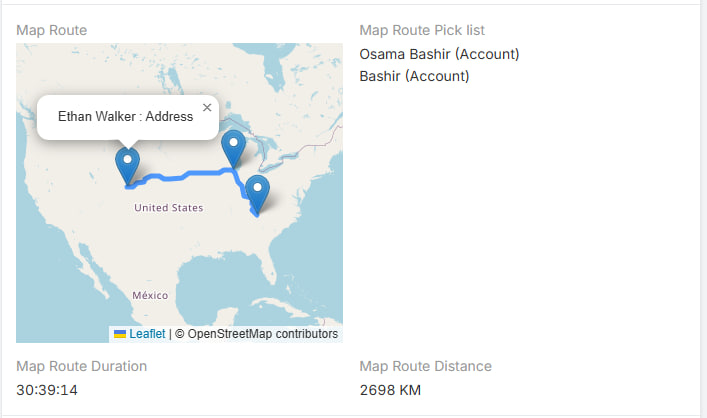
Extension video
Generated Route Fields
When a route field is created, it also creates related fields:
| Field | Description |
|---|---|
Distance |
Stores the route distance. |
Duration |
Stores the route duration. |
PickList |
Stores manually selected route points. |
Route Field Parameters
| Parameter | Description |
|---|---|
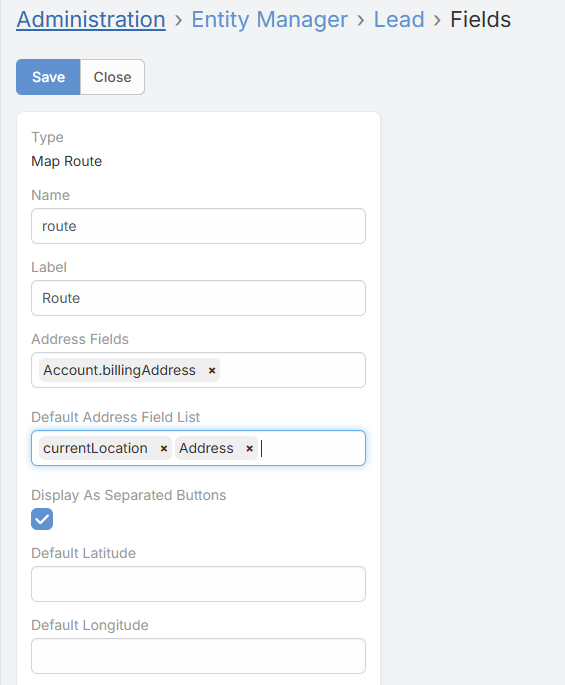
Address Fields |
Defines which address fields from other entities can be added manually to the route. |
Default Address Field List |
Adds local address fields from the current record to the route automatically. It also supports currentLocation. |
Display As Separated Buttons |
Shows separate add buttons for each configured source. |
Default Latitude |
Adds a fixed latitude point to the route. |
Default Longitude |
Adds a fixed longitude point to the route. |
How the Route Is Built
The route can include:
- the user's current location
- a fixed default point
- one or more address fields from the current record
- manually selected address fields from other records
The extension builds the final list of valid points and then requests the route.
How It Works in the Record
- The route is shown on an OpenStreetMap map.
- Markers are added for the start, stops, and end.
- Distance and duration are updated automatically when route points change.
- The generated
DistanceandDurationfields are read-only display fields.
Notes
- Distance display follows the global
Measurement Formatsetting.