Address Field Features
The extension enhances standard EspoCRM address fields with address search, current-position lookup, coordinates, and automatic geocoding.
Extension video
What Is Added to Address Fields
Added actions
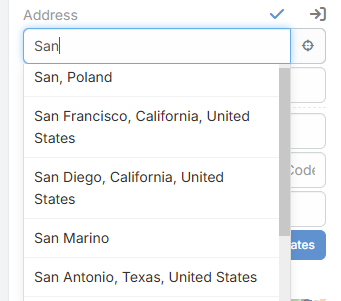
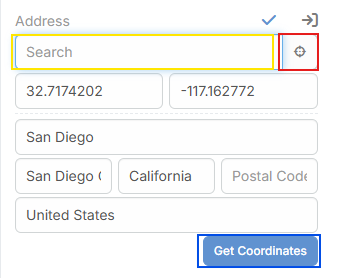
- Search Type in the search box and select a Photon result to fill street, city, state, country, postal code, latitude, and longitude.
- Locate Current Position Uses browser geolocation and Photon reverse lookup to fill the address from the user's current location.
- Get Coordinates Uses the current typed address to fetch coordinates and address data.
- Automatic Geocoding on Save
When the address changes and the provider is
OpenStreetMap, the extension can fill coordinates automatically before the record is saved.
Added address field parameters
| Parameter | Description |
|---|---|
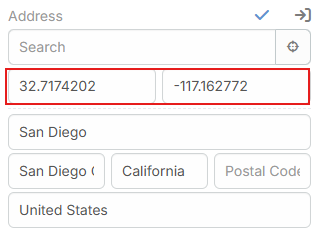
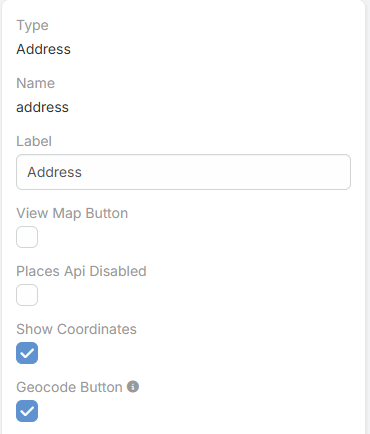
Show Coordinates |
Shows the latitude and longitude inputs in edit mode and read mode. |
Geocode Button |
Shows the Get Coordinates button in edit mode. |
Places Api Disabled |
Extension-defined parameter added to the address field metadata. |
How Search Works
- The search box appears in edit mode.
- Suggestions are shown while typing.
- Selecting a result fills the address values and coordinates.
- The selected result is also stored in the field data.
How Automatic Geocoding Works
- It runs only when the selected provider is
OpenStreetMap. - It checks changed address fields before save.
- It builds the address from country, city, state, and street.
- It requests matching data from Nominatim.
- The result is also stored in the field data.