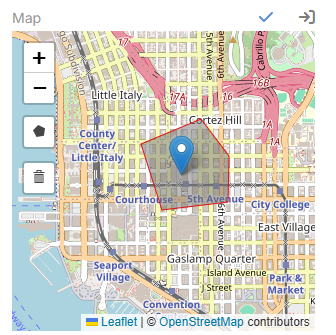
Address Map Features
The extension also enhances the Map field that belongs to an address field.
Extension video
Important
The draggable marker and polygon options are configured on the address field's companion Map field, not on the address field itself.
Example:
- Address field:
Billing Address - Related map field:
Billing Address (Map)
What the Address Map Can Do
- Show the saved address on an OpenStreetMap map
- Drag the marker and update latitude and longitude
- Check the dragged position and offer to update street, city, and state
- Draw polygons
- Delete polygons
Added Map Parameters
| Parameter | Description |
|---|---|
Marker Draggable |
Allows the marker to be dragged in edit mode. |
Enable Polygon |
Enables polygon drawing on the map. |
Stroke Weight |
Sets the polygon border width. |
Stroke Color |
Sets the polygon border color. |
Fill Color |
Sets the polygon fill color. |
Fill Opacity |
Sets the polygon fill opacity. |
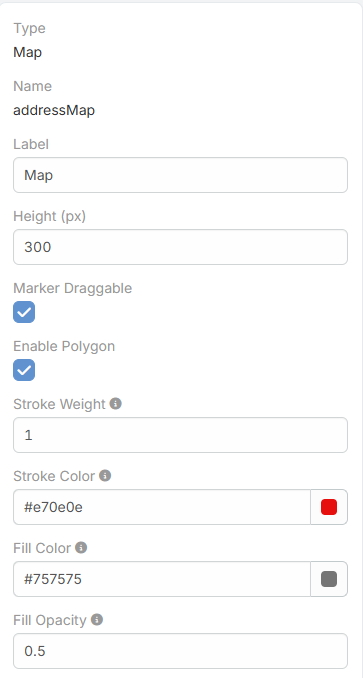
When Enable Polygon is turned on, the polygon style fields become visible.
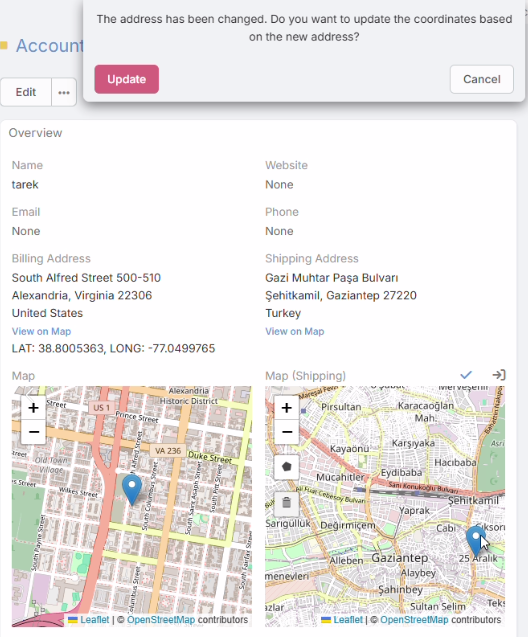
How Marker Dragging Works
- The user drags the marker in edit mode.
- The extension updates latitude and longitude.
- It reverse-checks the new position through Photon.
- If street, city, or state changed but the country is still the same, the user can confirm the address update.
How Polygon Drawing Works
- The user draws polygons on the map in edit mode.
- Polygon coordinates and style options are stored in the address field's
drawData. - Deleted polygons are also removed from the stored map data.