Email Analysis Panel
The Email Analysis panel appears on Email detail views and shows an AI-generated breakdown of the email thread.
Video
Requirements
Users need:
Aiaccess- Read access to Email
- A configured default AI provider
How It Loads
When the panel opens, it first checks for an existing cached analysis.
Current behavior:
- If a cached analysis exists, it is displayed immediately
- If no cached analysis exists, the panel stays empty until the user clicks the Analyze Email button
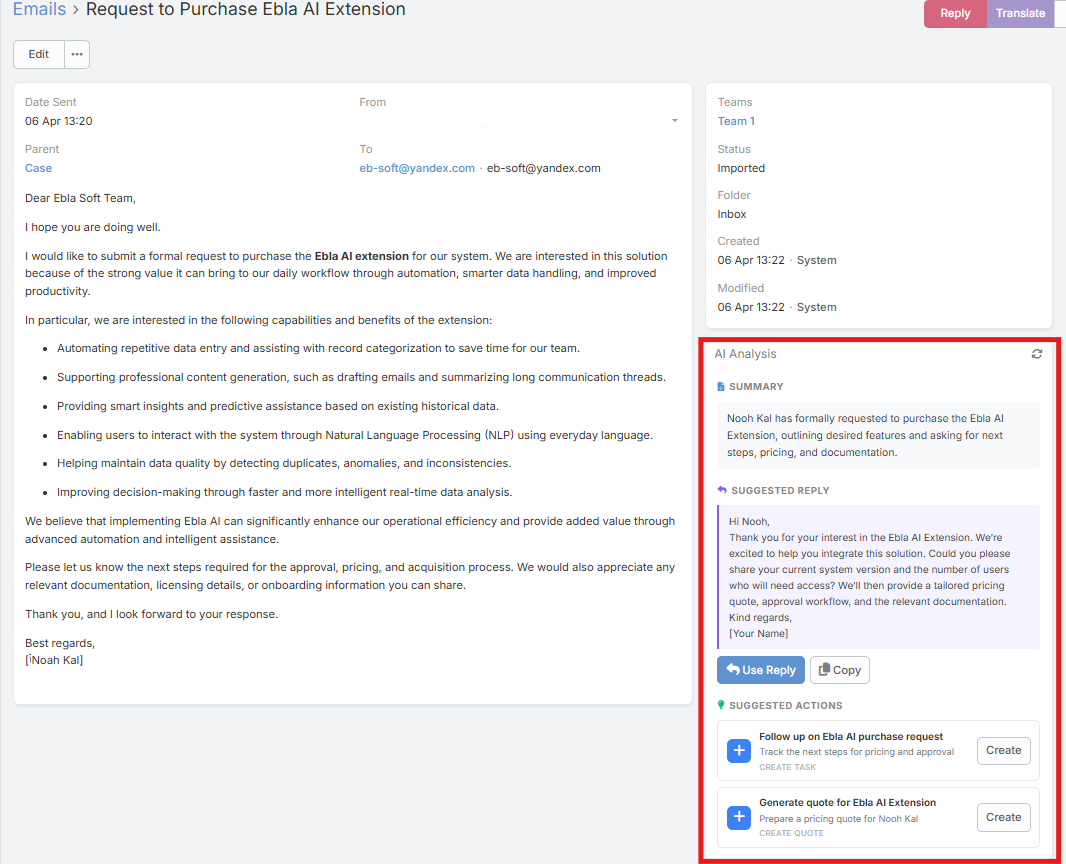
Sections Shown in the Panel
The panel currently shows up to four sections:
Summary
A concise overview of the thread.
Action Items
Structured action items extracted from the conversation.
Suggested Reply
A ready-to-edit reply draft with:
- Use Reply opens the compose modal with the suggested reply inserted above the original thread
- Copy
Suggested Actions
Suggested CRM actions presented as clickable cards, such as:
- Create a related record
- Update a related record
- Post a note to the stream
What It Analyzes
The analysis is based on the full thread context, not just the currently opened email body.
Re-analyzing
Use the refresh icon in the panel header when:
- A new reply has arrived
- The thread changed
- You want to regenerate the analysis