AI Sandbox
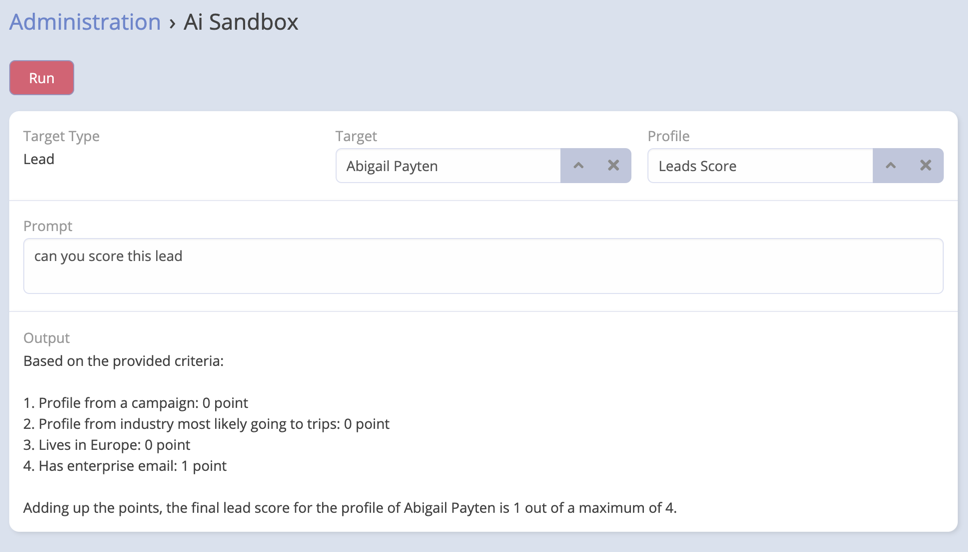
The AI Sandbox is an administrator-facing testing page for prompts and record-aware AI instructions. It lets you experiment with prompts, profiles, and optional tool-enabled execution without changing production data or normal user workflows.
Where to Find It
- Navigate to Administration.
- Open AI Sandbox from the Ebla AI administration section.
What the Sandbox Is For
Use the sandbox when you want to:
- Test a prompt against a real record
- Try a specific AI Profile
- Compare plain prompt execution with tool-enabled execution
- Inspect which tools were used during a tool-enabled request
Sandbox Fields
The page includes:
- Entity Type
- Target Record
- Profile
- Enable Tools
- Prompt
- Output
- Error
- Tools Used
Using the Sandbox
- Select an Entity Type.
- Optionally choose a Target Record.
- Optionally choose an AI Profile.
- Enter your prompt.
- Decide whether to enable Tools.
- Run the request.
Note
The available Target Record options depend on the selected Entity Type.
Run Modes
Standard Mode
With Enable Tools turned off, the sandbox sends the prompt through the generic AI execution flow.
This is useful for:
- Prompt drafting
- Testing profile behavior
- Evaluating output tone and structure
Tool-Enabled Mode
With Enable Tools turned on, the sandbox uses the AI Chat tool-calling flow instead of plain prompt execution.
This is useful for:
- Testing CRM-aware requests
- Validating tool-calling behavior
- Seeing which tools were used and how many iterations were required
Output Areas
Output
Displays the AI's final text result.
Error
Shows validation or request errors when the request fails.
Tools Used
In tool-enabled mode, this section shows:
- The tools called
- Their arguments
- Shortened result previews
- Iteration count
- Input and output token totals