AI PDF Template Generation
The AI PDF Template Generator creates EspoCRM PDF templates from a plain-language description. It generates a template name and a full HTML body designed for PDF rendering, including entity placeholders where appropriate.
Video
Where to Find It
The feature is available from the PDF Template list view.
- Navigate to Administration → PDF Templates.
- Click Generate PDF Template in the list view header.
How It Works
- Click Generate PDF Template.
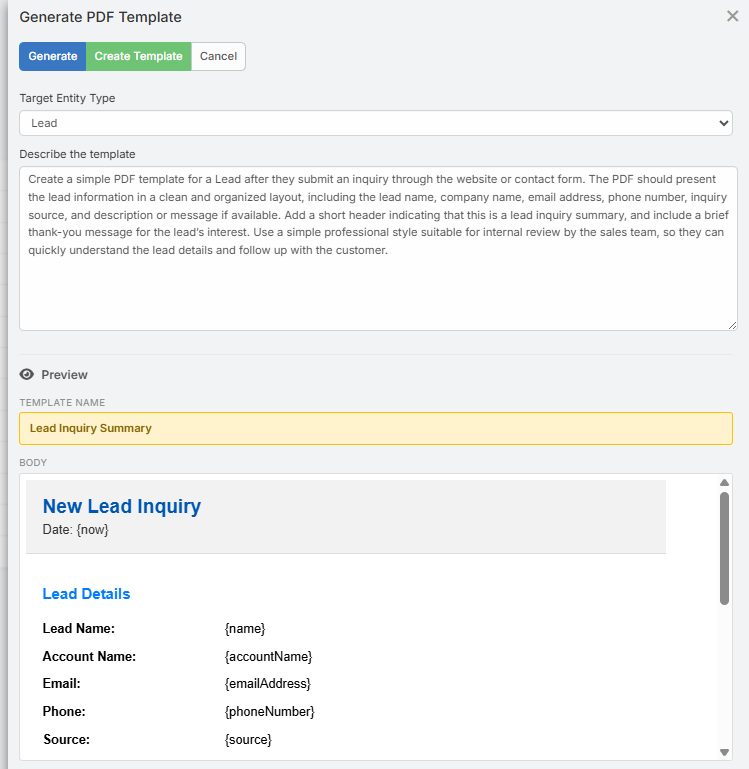
- A modal opens with:
- Entity Type - optional; used to expose the correct placeholders
- Description - describe the template you want to generate
- Click Generate.
- The AI returns:
- A template Name
- A complete HTML Body
- Review the live preview in the modal.
- Click Create Template.
- The standard EspoCRM PDF Template create form opens with the AI-generated content prefilled.
- Review the result and save.
Placeholder Support
When you choose an Entity Type, the generator uses the available fields of that entity to build the placeholder list.
Examples:
{name}{assignedUserName}{accountName}{today}{currentYear}
The AI is instructed to use only supported placeholders and keep them in EspoCRM's normal {placeholder} format.
Output Format
The generated PDF template body is:
- HTML-based
- Intended for PDF rendering
- Structured for print-friendly layouts
- Generated without wrapping
<html>,<head>, or<body>tags
Typical output includes:
- A document header
- A main content section
- Tables or structured blocks where useful
- A footer area
Tips for Better Results
- Mention the document purpose clearly, such as invoice, quote, proposal, statement, or certificate.
- Mention sections you want included, for example totals, customer details, payment instructions, or approval blocks.
- Select the correct entity type so the AI can use the proper placeholders.
Tip
A more specific description usually gives a much better result than a short generic phrase.
Notes
- The AI does not save anything automatically.
- The generated template is reviewed in the normal create form before you save.
- If the entity type is selected, the create form is opened with that entity context and the AI-generated body applied automatically.
Related Features
- AI Email Template Generatior - Generate email templates with placeholders
- AI Profiles - Configure provider, model, and behavior